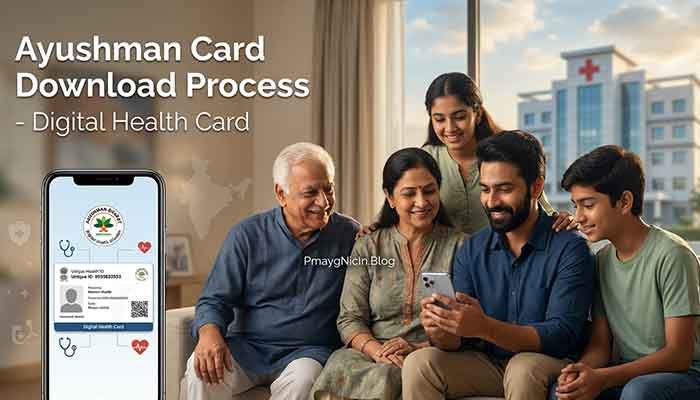
Ayushman Card Download: Step-by-Step Guide (2026)
INTRODUCTION
Last week, a neighbor came to me worried because she needed her Ayushman card urgently for her father’s hospital admission, but she had no idea how to download it. She thought she’d have to visit multiple government offices. I helped her download it online in just 10 minutes, and the relief on her face was priceless.
If you’re also confused about how to get your Ayushman card or download it online, you’re in the right place. I’m Suman, and through my work with government schemes, I’ve helped dozens of people navigate this process. In this guide, I’ll walk you through everything – from checking eligibility to downloading your card – in the simplest way possible.
QUICK SUMMARY (AT A GLANCE)
| Detail | Information |
|---|---|
| Scheme Name | Pradhan Mantri Jan Arogya Yojana (PM-JAY) |
| Purpose | Free health insurance up to ₹5 lakh per family per year |
| Key Benefit | Cashless treatment at empaneled hospitals |
| Latest Update | Digital download now available via setu.pmjay.gov.in |
| Official Website | pmjay.gov.in |
| Helpline | 14555 |
MY REAL-WORLD EXPERIENCE WITH AYUSHMAN CARDS
Through my research and community work, I’ve noticed one common pattern: most people don’t even know if they’re eligible for the Ayushman Bharat scheme. I’ve met families who struggled with medical bills despite being eligible beneficiaries.
I remember helping a construction worker’s family in my area. They had never heard of PMJAY, and when I checked their eligibility online, they were registered! Within 15 minutes, we downloaded their digital card. Two months later, the family used it for the mother’s surgery – completely cashless. That ₹1.2 lakh treatment cost them nothing.
This experience taught me that awareness is the biggest barrier. The download process itself is surprisingly simple once you know the steps.
Read More: MGNREGA Job Card – Check Status & Apply Online 2026
WHAT IS AYUSHMAN CARD DOWNLOAD?
The Ayushman Card, officially called the PM-JAY card, is your gateway to free healthcare under the Ayushman Bharat scheme. It’s essentially a health insurance card that allows eligible families to access cashless medical treatment worth up to ₹5 lakh per year at any empaneled hospital.
Earlier, people had to visit Common Service Centers (CSCs) or Ayushman Arogya Mandirs to get a physical card. But now, you can download a digital version directly from the official portal – setu.pmjay.gov.in. This digital card is equally valid and accepted at all PMJAY hospitals.
Think of it as your medical safety net that you can carry on your phone.
ELIGIBILITY CRITERIA
The Ayushman Bharat scheme targets India’s poorest and most vulnerable families. Eligibility is based on the Socio-Economic Caste Census (SECC) 2011 data. Here’s who qualifies:
Eligible Categories:
- Families living in kutcha houses (with one room, no walls, or kutcha walls)
- Destitute persons and those surviving on alms
- Manual scavenger families
- Primitive tribal groups
- Legally released bonded laborers
- Households with no adult member between age 16-59
- Female-headed households with no adult male member
- Households with disabled members and no able-bodied adult
- Landless agricultural laborers
- Rural families doing manual casual labor
Urban Workers (11 occupational categories):
- Ragpickers, beggars, domestic workers
- Street vendors, cobblers, hawkers
- Construction workers, painters, welders
- Washermen, security guards, coolies
Who is NOT Eligible:
- Government employees and their families
- Families owning motorized vehicles (except two-wheelers)
- Families with income tax-paying members
- Families owning agricultural machinery
- Those with monthly income above specified limits
Important Note: Eligibility is pre-determined. You cannot apply for PMJAY – you can only check if your name is already in the database.
REQUIRED DOCUMENTS
To download your Ayushman card, you’ll need:
| Document | Why It’s Needed |
|---|---|
| Aadhaar Card | Primary identity verification and authentication |
| Mobile Number | To receive OTP for verification |
| Ration Card | Alternative identification (if needed) |
| Family Details | Name of family head for searching the database |
| State/District Info | To locate your registration in the system |
Pro Tip from My Experience: Keep your Aadhaar card handy. The entire verification process works through Aadhaar OTP. If your mobile number isn’t linked to Aadhaar, get it linked first at any Aadhaar center.
HOW TO DOWNLOAD AYUSHMAN CARD (STEP-BY-STEP GUIDE)
Let me break this down into the simplest steps possible. I’ve tested this process multiple times to ensure anyone can do it.
Step 1: Check Your Eligibility First
Before trying to download the card, verify if you’re eligible:
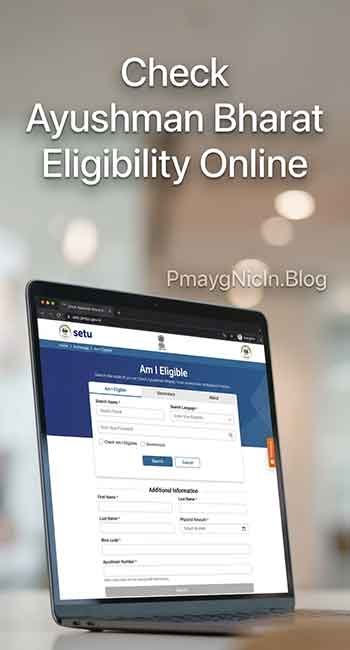
- Visit the official website: setu.pmjay.gov.in
- Click on “Am I Eligible” section
- Enter your mobile number
- Enter the OTP received on your phone
- Search using one of these methods:
- By Aadhaar number
- By mobile number
- By ration card number
- By name
If your name appears in the search results with an HHD number (Health & Hospitalization Database number), congratulations – you’re eligible!
Step 2: Access the Download Portal
- On the same website (setu.pmjay.gov.in), look for “Download Ayushman Card” or “Beneficiary” section
- You may also use the direct beneficiary portal
- Some states have separate portals – the website will redirect you automatically
Step 3: Login Using Aadhaar
- Enter your Aadhaar number
- Tick the consent checkbox
- Enter the captcha code shown on screen
- Click “Generate OTP”
- Enter the 6-digit OTP sent to your Aadhaar-linked mobile number
- Click “Submit”
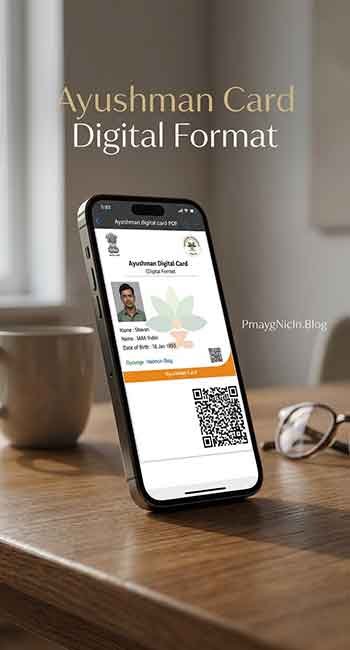
Step 4: View and Download Your Card
- Once logged in, you’ll see your family details
- Click on your name or the family member’s name whose card you want
- The digital Ayushman card will appear on screen showing:
- Photo (if uploaded)
- Name and age
- HHD number
- Scheme details
- QR code
- Click the “Download” button
- The card will be downloaded as a PDF file
Step 5: Save and Print
- Save the PDF on your phone or computer
- Take a printout if needed
- You can also save a screenshot for quick access
My Practical Advice: Save the PDF in multiple places – your phone, email, and Google Drive. I’ve seen people lose their cards and then struggle to re-download during emergencies.
COMMON PROBLEMS USERS FACE & SOLUTIONS
Through my interactions with beneficiaries, here are the most frequent issues and how to solve them:
Problem 1: “My Name Doesn’t Show in Eligibility Search”
Solution: This usually means either:
- You’re not in the SECC 2011 database
- Your details are registered under a different family member’s name
- There’s a spelling error in your name
Try searching with different family members’ names. If still not found, visit your nearest Ayushman Arogya Mandir or CSC with your ration card and Aadhaar. They can check the database more thoroughly.
Problem 2: “OTP Not Received on Mobile”
Solution:
- Ensure your mobile number is linked to your Aadhaar card
- Check if you have network connectivity
- Wait for 2-3 minutes before requesting a new OTP
- Try using an alternative verification method if available
I’ve found this is the most common technical issue. If your number isn’t Aadhaar-linked, you’ll need to visit an Aadhaar center first.
Problem 3: “Website Shows Error or Doesn’t Load”
Solution:
- Clear your browser cache and cookies
- Try a different browser (Chrome works best in my experience)
- Avoid peak hours (early morning 6-8 AM works well)
- Check your internet connection
- The portal undergoes maintenance occasionally – try after a few hours
Problem 4: “Downloaded Card Has No Photo”
Solution: This is actually normal for many beneficiaries. Photos are uploaded only if you’ve visited an Ayushman center or hospital previously. The card is still 100% valid without a photo. Your Aadhaar serves as photo ID alongside the card.
Problem 5: “Card Downloaded But Hospital Doesn’t Accept It”
Solution:
- Ensure the hospital is empaneled under PMJAY (check the hospital list on the website)
- Show both the digital card and your Aadhaar card
- Contact the hospital’s Ayushman Mitra (help desk person)
- Call the helpline 14555 if the hospital refuses unreasonably
In my experience, most empaneled hospitals readily accept digital cards now. But smaller hospitals sometimes prefer physical cards – in such cases, you can get one printed at any CSC for ₹10-30.
FREQUENTLY ASKED QUESTIONS (FAQs)
Yes, absolutely. The digital card downloaded from setu.pmjay.gov.in is 100% valid and accepted at all PMJAY empaneled hospitals across India. You should carry it along with your Aadhaar card for verification.
Yes, once you log in using any family member’s Aadhaar, you can see all eligible family members listed and download individual cards for each person.
The download is completely free. You don’t need to pay anything. Beware of middlemen who ask for money – it’s a scam. The official portal charges nothing.
You’ll need to link it first. Visit any Aadhaar enrollment center with your Aadhaar card and mobile phone. The linking is free and takes about 10 minutes. Without this, you cannot complete the OTP verification.
You can use it only in hospitals that are empaneled under the PMJAY scheme. Both government and private hospitals can be empaneled. Check the hospital list on the PMJAY website before going for treatment. Currently, over 27,000 hospitals are empaneled across India.
IMPORTANT DISCLAIMER
This article is created for informational purposes only, based on my research and understanding of the Ayushman Bharat PMJAY scheme. I am not affiliated with the Government of India or the National Health Authority.
While I’ve made every effort to ensure accuracy, government schemes and their processes can change. I strongly encourage you to:
- Verify all information from the official website: setu.pmjay.gov.in
- Contact the official helpline: 14555 for scheme-specific queries
- Visit your nearest Ayushman Arogya Mandir for in-person assistance
- Check for the latest updates and notifications on the official portal
This guide is meant to simplify the process, but official sources should be your final reference for any action.
CONCLUSION
Downloading your Ayushman card is no longer the complicated process it once was. With the digital portal, you can get your card from the comfort of your home in just a few minutes. The key is knowing your eligibility first, having your Aadhaar details ready, and following the simple steps I’ve outlined.
From my experience helping people with this process, I can tell you that the biggest barriers are awareness and confidence. Once you try it yourself, you’ll realize how user-friendly the system has become.
If you found this guide helpful, please share it with others who might benefit from it. Healthcare is a basic right, and the Ayushman Bharat scheme is one of the government’s most impactful initiatives. Don’t let a lack of information prevent you or your family from accessing these benefits.
Have questions or facing any issues with your Ayushman card download? Feel free to ask in the comments below, and I’ll do my best to help based on my experience.
Remember, your health matters, and your Ayushman card could be the safety net that protects your family from financial distress during medical emergencies.